By Afla KC , Digital Marketing Executive
When a company has 10 or 15 employees, managing HR through spreadsheets, emails, physical documents and manual follow-ups may seem completely manageable.
But as the employee count grows, the same approach starts becoming harder to maintain.
More employees mean more attendance records, leave requests, payroll inputs, documents, onboarding activities, approvals and employee queries. What once took a few minutes can eventually take hours.
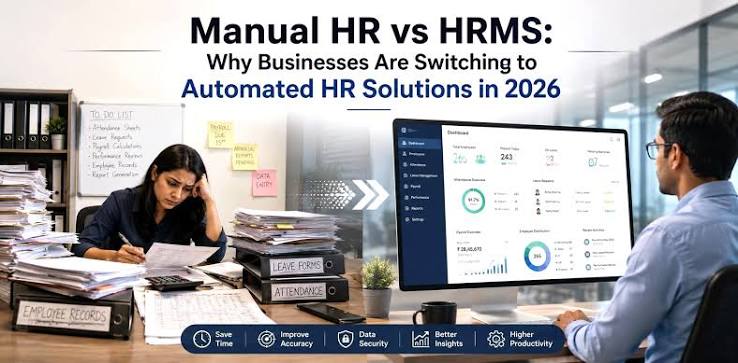
This is where the difference between manual HR and an HRMS (Human Resource Management System) becomes more visible.
An HRMS does not simply replace spreadsheets with software. It can change how HR information is collected, processed, approved, stored and used across the organization.
So, what actually changes when an employee count grows?
1. Employee Data Becomes Harder to Manage
In a small company, HR may maintain employee information in one or two spreadsheets.
As the workforce grows, employee data can become scattered across:
Excel files
Physical files
Emails
Google Sheets
Attendance systems
Payroll records
Individual folders
This creates a risk of duplicate or outdated information.
Manual HR
HR has to update employee information in multiple places.
HRMS
Employee information can be maintained in a centralized employee database, depending on the system.
This can make it easier to access details such as:
Employee profile
Department
Designation
Joining date
Reporting manager
Contact details
Salary information
Documents
Employment status
The bigger the workforce becomes, the more important centralized data management becomes.
2. Attendance Management Changes Completely
Attendance is relatively simple when a business has a small team.
Imagine manually checking attendance for 20 employees.
Now imagine doing the same for 100 or 300 employees across different shifts or locations.
Manual tracking can involve:
Attendance Data → Spreadsheet → Verification → Corrections → Payroll
Each additional step creates more work.
With an HRMS, attendance information can be integrated into the employee management process, depending on the organization’s setup.
It can support areas such as:
Daily attendance
Shift management
Late arrivals
Early departures
Overtime
Attendance regularisation
Work-from-home tracking
This reduces the amount of manual consolidation required from HR.
3. Leave Requests Become Easier to Track
When there are only a few employees, leave requests through email or WhatsApp may appear convenient.
But as the employee count increases, HR may receive multiple requests every day.
The challenge becomes:
Who approved the leave?
How many leaves are remaining?
Is the employee eligible?
Was the leave updated in attendance?
Does the manager know?
Is the payroll team aware?
Manual Process
Employee → Message/Email → Manager → HR → Spreadsheet → Update
HRMS Process
Employee → Leave Request → Manager Approval → HR Record
The exact workflow depends on the system, but the objective is the same: make the process structured and easier to track.
4. Payroll Requires More Coordination
Payroll becomes significantly more complicated as the number of employees increases.
Payroll inputs may come from:
Attendance
Leave
Overtime
Incentives
Reimbursements
Salary changes
Advances
Deductions
Other employee-related adjustments
With manual HR, these inputs may need to be collected and consolidated from different sources.
An HRMS can help centralize payroll-related information and reduce repetitive data entry.
However, businesses should still review payroll calculations and applicable statutory requirements carefully. Software supports the process; it does not remove the need for proper HR and payroll controls.
5. Employee Queries Increase
As employee numbers grow, HR teams often receive more routine questions.
For example:
“How many leaves do I have?”
“Can I download my payslip?”
“Has my leave been approved?”
“Where can I find my HR documents?”
When there are 20 employees, answering these questions may take only a small amount of time.
When there are 200 employees, the same questions can consume a significant portion of the HR team’s working day.
An HRMS with employee self-service can allow employees to access certain information themselves.
This can reduce repetitive HR queries and give employees greater visibility.
6. Employee Onboarding Becomes a Process, Not a Conversation
In a small company, onboarding may be handled through a few emails and a conversation with the HR team.
As hiring increases, this becomes difficult to maintain consistently.
A growing company may need to collect:
Identity documents
Educational certificates
Bank information
Tax-related information
Emergency contact details
Signed policies
Employment documents
An HRMS can help create a standardized onboarding workflow.
For example:
Offer Accepted → Documents Collected → Employee Profile Created → Policies Shared → Payroll Setup → Onboarding Completed
This helps ensure that every new employee goes through the required process.
7. Document Management Becomes More Important
Physical employee files can work at a very small scale.
But imagine searching through hundreds of employee files to find one document.
Digital document management can make this easier by organizing employee records within a centralized system.
Depending on the HRMS, HR may be able to manage:
Offer letters
Appointment letters
ID documents
Certificates
Salary documents
Policy acknowledgements
Experience records
Exit documents
Access permissions should also be properly configured because employee records contain sensitive information.
8. Performance Management Becomes More Structured
In a small team, managers may know every employee personally.
As the organization grows, this becomes less practical.
Performance discussions can become inconsistent if they depend entirely on informal conversations.
An HRMS can support structured processes such as:
Goal setting
KPI tracking
Performance reviews
Feedback
Self-assessments
Review history
This gives managers and HR a more consistent framework for performance discussions.
The goal is not simply to add more forms.
The goal is to make performance management more structured as the organization becomes larger.
9. HR Approvals Become More Complex
As the company grows, the number of approvals also increases.
These can include:
Leave approvals
Expense approvals
Attendance corrections
Employee requests
Salary changes
Onboarding approvals
Exit clearances
With manual processes, approvals can become dependent on emails and messages.
An HRMS can create predefined workflows where requests are automatically routed to the appropriate person.
This can improve visibility into:
Requested → Pending → Approved → Completed
10. HR Compliance Becomes Harder to Track Manually
Larger organizations generally have more employee records and more HR activities to manage.
Depending on the organization, HR may need to manage areas such as:
Statutory deductions
Employee records
Required registers
Tax-related information
Leave records
Payroll records
Employment documentation
An HRMS can help organize information and generate reports that support HR administration.
But businesses should not assume that using an HRMS automatically means they are compliant.
Applicable requirements vary based on factors such as location, employee category and organizational structure.
Regular HR review remains important.
11. HR Reporting Changes From Data Collection to Decision-Making
One of the biggest differences between manual HR and HRMS is reporting.
With manual systems, HR may spend considerable time preparing reports.
For example:
Employee Count → Excel → Clean Data → Create Formula → Prepare Report → Share With Management
An HRMS can provide structured data and reports depending on the platform.
Management may be able to monitor information such as:
Headcount
Department-wise employees
Attendance
Leave trends
Employee turnover
Hiring
Workforce costs
Performance information
The value is not simply having dashboards.
The real benefit comes when HR can use reliable information to support better workforce decisions.
12. Employee Exits Need More Coordination
Employee exits also become more complicated as the workforce grows.
HR may need to coordinate:
Resignation → Notice Period → Handover → Attendance → Payroll → Asset Return → Access Removal → Full & Final Settlement → Exit Documents
With manual HR, these steps may be tracked through separate spreadsheets, emails and checklists.
An HRMS can help create structured workflows and track the status of exit-related activities.
This can reduce the risk of missing important steps.
Manual HR vs HRMS: At a Glance
HR AreaManual HRHRMSEmployee recordsSpreadsheets/filesCentralized databaseAttendanceManual tracking/consolidationSystem-based trackingLeaveEmails/messages/spreadsheetsDigital requests and approvalsPayroll inputsMultiple sourcesCentralized informationDocumentsPhysical/digital foldersOrganized employee recordsOnboardingManual coordinationWorkflow-based processEmployee queriesHR-dependentSelf-service optionsApprovalsEmail/messagesDefined workflowsPerformanceInformal/manualStructured processReportingManual preparationSystem-generated reportsExit processChecklists/follow-upsWorkflow-based tracking
When Does Manual HR Start Becoming Difficult?
There is no universal employee number at which every company must adopt an HRMS.
A business with 30 employees and complex shifts may need HR technology earlier than a business with 75 employees and simple operations.
Instead of focusing only on headcount, look for these warning signs:
1. HR spends too much time on repetitive administration.
2. Employee information exists in multiple spreadsheets.
3. Payroll requires extensive manual reconciliation.
4. Leave and attendance errors are becoming common.
5. Managers frequently ask HR for employee information.
6. Employees repeatedly ask for routine information.
7. Onboarding takes too much coordination.
8. HR reports take hours to prepare.
9. Employee documents are difficult to retrieve.
10. HR processes depend heavily on one person.
These are often stronger indicators than employee count alone.
HRMS Is Not About Replacing HR
One common misconception is that HRMS is designed to replace HR professionals.
That is not the purpose.
An HRMS can automate repetitive administrative tasks, but HR professionals still play an important role in:
Employee relations
Conflict resolution
Policy development
Workforce planning
Performance discussions
Culture building
Talent management
Strategic decision-making
The technology handles structured information and workflows.
People still handle people.
How SMEs Can Transition From Manual HR to HRMS
Businesses do not necessarily need to digitize every HR process overnight.
A phased approach can be more practical.
Phase 1: Build the Foundation
Start with:
Employee database
Attendance
Leave management
Phase 2: Improve Administration
Add:
Payroll inputs
Document management
Employee self-service
Onboarding
Phase 3: Build Structured HR
Introduce:
Performance management
Approval workflows
Exit management
HR reporting
Phase 4: Use Data for Decisions
Once the foundation is reliable, organizations can focus on:
Workforce analytics
Employee trends
Turnover analysis
Workforce planning
Process optimization
The objective is to build the system gradually instead of creating unnecessary complexity.
The Real Change Is Scale
The biggest difference between manual HR and HRMS is not simply technology.
It is how well the HR function can handle growth.
A manual process may work perfectly when a company has 15 employees.
But when that same company reaches 100 employees, the number of transactions, approvals, records and queries increases significantly.
The HRMS helps create systems that can handle that increased volume more consistently.
Instead of asking:
“How can HR manage more employees?”
The organization can start asking:
“How can we build HR processes that scale with the business?”
Conclusion
Manual HR is not automatically inefficient, and an HRMS is not automatically better for every organization.
The right choice depends on the company’s size, complexity, workforce structure, budget and operational requirements.
But as employee numbers grow, manual processes can become increasingly difficult to maintain.
Attendance, leave, payroll inputs, employee records, onboarding, documents, approvals, performance management and reporting all generate more administrative work.
An HRMS can help bring these processes into a more structured system.
The goal should not be to automate HR simply because the company is growing.
The goal should be to build HR processes that can grow with the company without creating unnecessary administrative workload.
For a growing SME, that shift—from managing HR manually to building scalable HR systems—can be an important step toward a more organized and efficient workplace.
SEO Keywords
Primary Keywords: Manual HR vs HRMS, HRMS for SMEs, HRMS for growing businesses, HR automation
Secondary Keywords: Manual HR processes, HR software for SMEs, employee management system, HR digitization, HR process automation, attendance management, leave management system, payroll automation, employee self-service, HR technology